SysMail VCF to PST Converter
SysMails VCF to PST Converter is a powerful and 100% safe program to easily works to recover data from VCF file and Convert vCard files to PST without making changes in database. Software allows users to Import Single and multiple VCF Contacts into PST Outlook, EML, MSG, Gmail/G-suits, IMAP Live Exchange Server and office 365 accounts. vCard to Outlook Import tool is windows program that supports the entire vCard versions (2.1, 3.0, 4.0) and is well-matched with all versions of MS Outlook, ensuring an accurate conversion experience.
- It easily works to extract and Convert single or multiple VCF files to PST in one go.
- Software preserve the entire contacts details such as- emails, address, name, notes and phone number.
- Software supports all vCard versions included (2.1, 3.0, and 4.0) for maximum flexibility.
- It previews of all contacts details before VCF to PST Conversion.
- Helps you to Export converted PST File into any Outlook supported versions included- 2021, 2019, 2016 and below versions.
- It maintains complete data integrity, folders, sub-folders structure, emails properties- to, bcc, cc, time, subjects during migration.
- Software works on all Windows operating systems including Windows 11, 10 and below versions.
- Import VCF to Outlook PST, EML, MSG, Live Exchange Server, Office 365 accounts, IMAP and Gmail accounts.
- There is no need of MS Outlook application to perform Convert VCF to PST format.
- Provides date filtering option to Export selective items between two dates.
- It supports all VCF file size and Export VCF to PST File with emails and attachments.
Export Large vCard Files to Outlook
SysMails VCF to PST Converter Software easily handle even large VCF file without data loss risk. Software works quickly recovery of VCF file contacts data and Convert the entire Contacts from VCF to PST format. You can also select to Import VCF contacts directly into Outlook or save them in an existing Outlook profile in easy way.
Selective vCard to Outlook Conversion
With downloading this vCard contact converter software, you can choose exactly which VCF files you want to Export. This feature helps you to Convert selective contacts and items from folders that contains several vCard files, so you don’t waste time converting unwanted ones.
No Outlook Installation Needed
SysMails VCF File Converter is 100% safe for downloading and it works independently, without Outlook requirement perform conversion task. Just upload your .VCF files into the software and it will Export them to Outlook compatible PST format easily.
Preserve All Contact Details
The best vCard to Outlook Import Tool ensures that all data of your contacts details remains safe and secure during the conversion time. It easily Export and Import the entire field such as- phone number, names, emails address, work details, notes and etc without data loss and changes in existing data.
Supports All vCard Versions
This SysMails VCF Converter is powerful tool that easily supports vCard versions 2.1, 3.0, and 4.0. It works flawlessly with contacts converted from email services, mobile phones, desktop apps, and cloud platforms like iCloud, Skype, G Suite, and others.
Import Contacts into Multiple Format
SysMails VCF to PST Converter Software is one best that allows users to add their contacts to an existing PST File. SO, you can simply choose your PST File on your computer, and the software will automatically Import your selected VCF Contacts into PST, EML, MSG, Gmail/G-suits, IMAP Live Exchange Server and office 365 accounts.
SysMail VCF to PST Converter: Screenshots

Step-1
Select vCard file

Step-2
View emails data
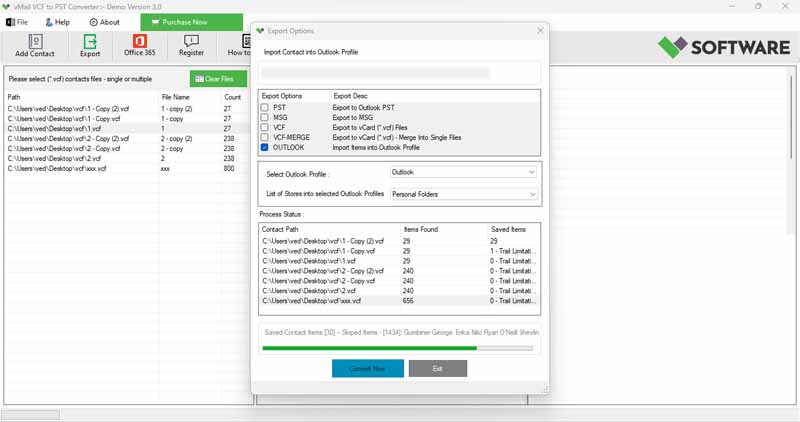
Step-3
Select Export Options
What Our Client Say
“I enjoyed the option to choose only the contacts I wanted. The SysMails VCF Converter software is very easy to usage, even for non-technical users.”

Niamah Hower
Founder“I tried the demo first and then bought the full version. Both worked effortlessly. The best VCF to PST converter I’ve used.”

Alivin Corondo
Designer“The SysMails VCF to PST Converter software helped me to Exported my business contacts into PST within minutes. Saved me a lot of manual work.”

Steph Kruse
FounderFrequently Asked Questions