SysMail Office 365 Email Migration Tool
SysMails Office 365 Email Migration Tool is most trustworthy and powerful application that effortlessly recover data from Office 365 accounts and Migrate Office 365 mailboxes data to other email service. With using this tool, you can save and restore emails from O365 accounts with maintains data. Office 365 Migration Tool helps you to take backup of your emails and mailboxes and gives you best result by providing easy conversion process. Software supports all versions of windows OS and you can easily download this on your Systems to Convert emails and mailboxes items.
- Software allows you Migrate emails from Office 365 accounts to PST Outlook.
- Helps you take backup from Office 365 mailboxes, shared folders and special archive.
- It allows you add CSV File that you want to migrate its contacts.
- Software preview of your Office 365 accounts emails before accurate migration.
- Software allows you brink back your O365 emails items using Outlook file such as- OST and PST File.
- Tool allows you add single and multiple OST File and PST file together and restore them all at the same time.
- Allows you Migrate emails, journals, task, notes, contacts from Office 365 accounts to another email’s sources.
- Export Office 365 emails with attachments into PST, MSG, EML, HTML, PDF, HTML and 15+format.
- You can delete all un-wanted emails and folders for easy backup.
- Software provides date filtering option to convert emails by date selection and items only.
- Software preserve folders structure, emails formatting and properties during migration time.
- Software supports all MS Outlook and windows versions OS for Office 365 Email Migration.
24/7 Technical Support
Our SysMails Office 365 Migration Tool has easy user interface. Even if you have no technical expertise, you can operate it easily. If you ever need help, our dedicated supports team is available 24 hours by live chat to help you solve all issues instantly.
Import OST & PST Files to Office 365
Along with backing up Office 365 Mailboxes, the SysMails Office 365 Email Backup tool gives complete authority to Import Outlook OST and PST Files directly into Office 365. This feature is very useful during the migration or when converting specific mailbox items into a required format.
Remove Duplicate Emails Automatically
SysMails Office 365 Email Migration Tool allows you option to remove all duplicate items from during migration process. Software scans and remove duplicate messages based on key parameters such as- sender, subjects, receiver, bcc, and email body —ensuring a clean and clutter-free migration.
Export Office 365 Emails into Multiple Formats
With using the best SysMails Office 365 Email Migration tool you can smoothly recover data from Office 365 and migrate into multiple format such as- PST, OST, EML, EMLX, MBOX, MSG, CSV, HTML, PDF, MHTML, TXT, DOCX, DOCM, and DOC. This helps in sharing backup, archiving and or further migration.
Date-Based Email Filtering
The SysMails Office 365 Email Migration Too includes a powerful date filter option, letting users to select a specific date range—from “From Date” to “To Date”—to migrate only the required emails. Throughout the process, all formatting, metadata, and folder structure are preserved.
Compatible with All Windows Versions
The office 365 migration tool supports all major Windows operating systems, including Windows 11, 10.1, 10, 8.1, 8, Vista, and Windows Server editions. This ensures smooth performance and reliability for all users.
SysMail Office 365 Email Migration: Screenshots
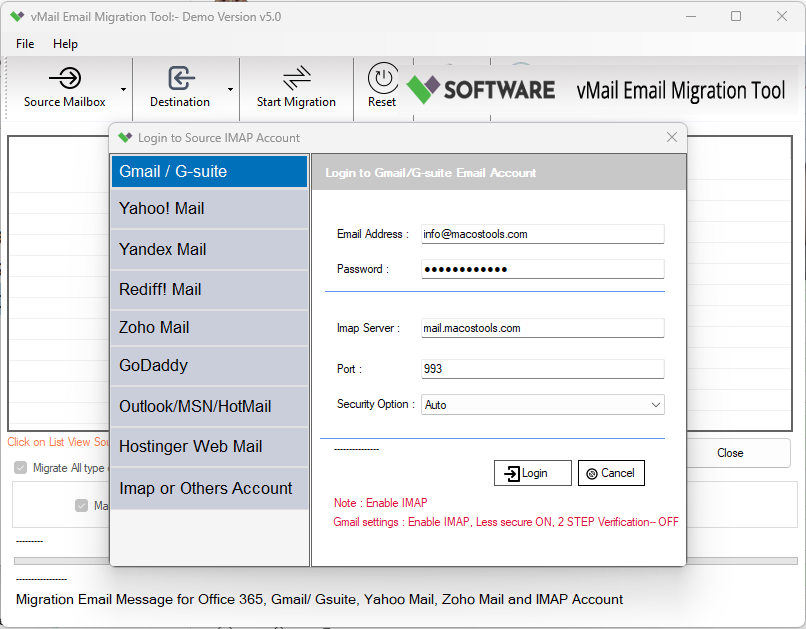
Step-1
Select Office 365 Email

Step-2
View emails data
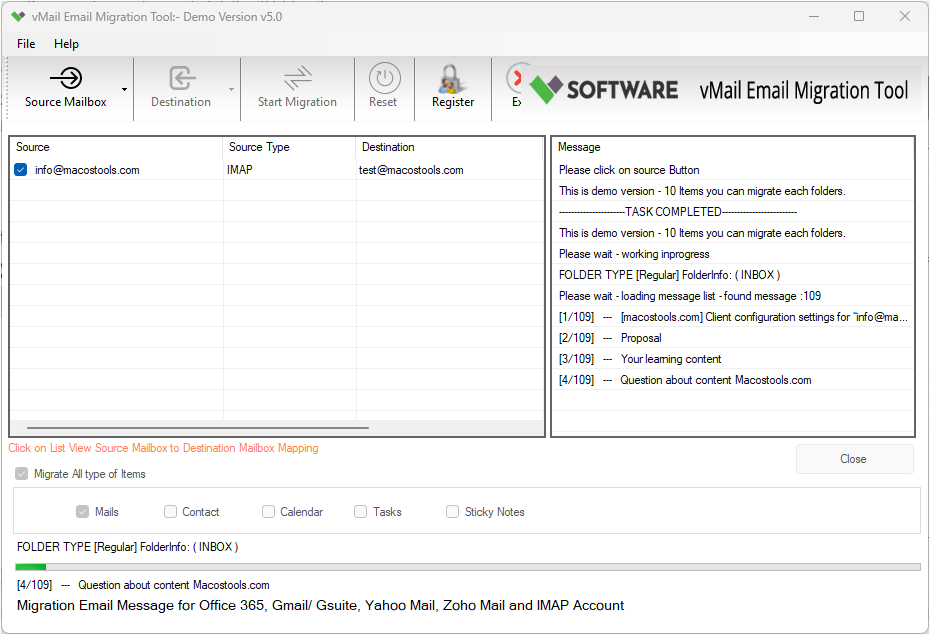
Step-3
Select Export Options
What Our Client Say
“Very simple to use and extremely reliable. I was able to migrate PST files into Office 365 without any data loss. Highly recommended!”

Niamah Hower
Founder“The date filter function is incredibly useful. I migrated only the important emails within minutes. Great tool for professionals.”

Alivin Corondo
Designer“One of the best migration tools I’ve used. Fast, accurate, and supports so many formats. Perfect for business migrations.”

Steph Kruse
FounderFrequently Asked Questions